






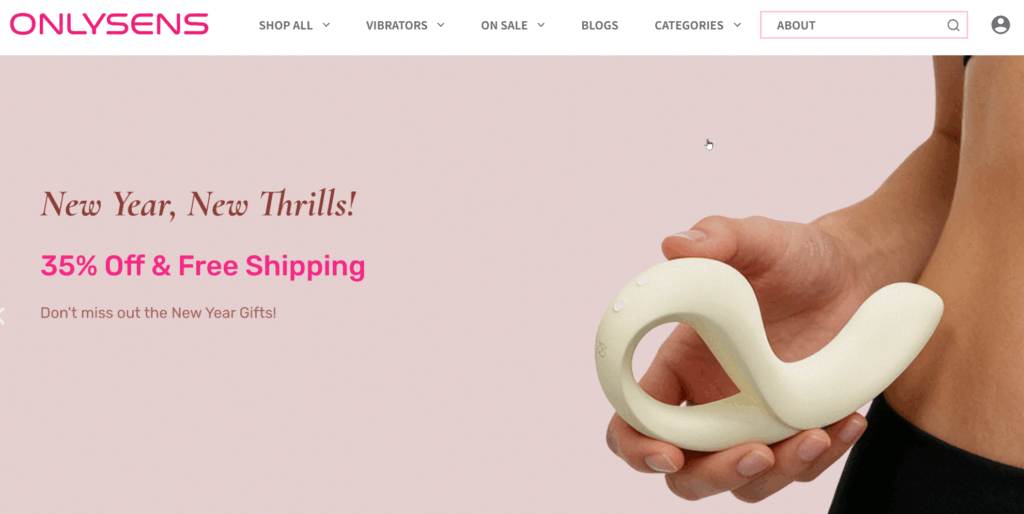
下面是折叠式超级菜单中引用的代码。修改方法如下:
<!DOCTYPE html>
<html lang="zh-CN">
<head>
    <meta charset="UTF-8">
    <meta name="viewport" content="width=device-width, initial-scale=1.0">
    <title>高级联动导航系统</title>
    <style>
        :root {
            --primary-color: #e91e63; /* 品牌粉色 */
            --nav-bg: #ffffff;
            --border-color: transparent;
            --text-main: #333333;
            --text-sub: #666666;
            --btn-hover: #d81b60;
        }

        /* 基础容器 - 纯白背景,无边框,全宽 */
        .nav-system-container {
            display: flex;
            width: 100%;
            margin: 0;
            background: #fff;
            overflow: hidden;
            height: 700px;
        }

        /* --- 左侧导航栏 - 20% 宽度 --- */
        .nav-sidebar {
            width: 20%;
            background: #fff;
            display: flex;
            flex-direction: column;
            overflow-y: auto;
            scrollbar-width: none; /* 隐藏滚动条 */
        }

        .nav-sidebar::-webkit-scrollbar {
            display: none;
        }

        /* 大类目样式 */
        .big-cat {
            border: none;
        }

        .big-cat-header {
            padding: 12px 0;
            display: flex;
            justify-content: space-between;
            align-items: center;
            cursor: pointer;
            font-weight: 600;
            color: var(--text-main);
            transition: color 0.2s;
            user-select: none;
            font-size: 16px;
        }

        .big-cat-header:hover {
            color: var(--primary-color);
        }

        /* 箭头图标 */
        .arrow-icon {
            width: 8px;
            height: 8px;
            border-right: 1.5px solid #ccc;
            border-bottom: 1.5px solid #ccc;
            transform: rotate(45deg);
            transition: transform 0.3s;
            margin-right: 10px;
        }

        .big-cat.active .arrow-icon {
            transform: rotate(-135deg);
        }

        /* 小类目容器 */
        .sub-cat-list {
            max-height: 0;
            overflow: hidden;
            transition: max-height 0.4s ease-out;
            background: #fff;
        }

        .big-cat.active .sub-cat-list {
            max-height: 800px;
        }

        /* 小类目单项 - 修改为 flex 布局以支持图标 */
        .sub-cat-item {
            padding: 8px 0 8px 15px;
            cursor: pointer;
            font-size: 14px;
            color: var(--text-sub);
            transition: all 0.2s;
            display: flex;
            align-items: center; /* 图标与文字垂直居中 */
            text-decoration: none;
        }

        /* 子菜单图标样式 */
        .sub-cat-img {
            width: 20px;
            height: 20px;
            margin-right: 10px;
            object-fit: contain;
            /* 如果图片有背景色,可以加 border-radius: 4px; */
        }

        .sub-cat-item:hover, .sub-cat-item.active {
            color: var(--primary-color);
        }

        /* --- 右侧内容区 - 80% 宽度 --- */
        .display-content {
            width: 80%;
            padding: 0 40px;
            overflow-y: auto;
            position: relative;
        }

        .panel {
            display: none;
            animation: fadeIn 0.3s ease;
        }

        .panel.active {
            display: block;
        }

        @keyframes fadeIn {
            from { opacity: 0; }
            to { opacity: 1; }
        }

        /* 标题样式 */
        h3 {
            margin-top: 10px;
            font-size: 18px;
            margin-bottom: 20px;
            color: var(--text-main);
            border-bottom: 1px solid #f5f5f5;
            padding-bottom: 10px;
            display: flex;
            justify-content: space-between;
            align-items: baseline;
        }

        /* 标题后的 View More 链接 */
        .view-more-link {
            font-size: 13px;
            font-weight: normal;
            color: var(--text-sub);
            text-decoration: none;
            margin-left: 10px;
            transition: color 0.2s;
        }

        .view-more-link:hover {
            color: var(--primary-color);
        }

        /* 底部 View All 按钮 */
        .view-all-container {
            margin-top: 30px;
            margin-bottom: 40px;
            opacity: 0; /* 初始状态设为透明 */
        }

        /* 使用多重选择器提高优先级,确保文字永远是白色 */
        .display-content .panel .view-all-container a.view-all-btn,
        .view-all-btn,
        .view-all-btn:link,
        .view-all-btn:visited,
        .view-all-btn:hover,
        .view-all-btn:active {
            display: inline-block;
            padding: 10px 25px;
            background-color: var(--primary-color) !important;
            color: #ffffff !important; /* 强制纯白 */
            text-decoration: none !important; /* 去掉下划线 */
            border-radius: 4px;
            font-size: 14px;
            font-weight: 500;
            transition: all 0.2s;
        }

        /* 响应式调整 */
        @media (max-width: 768px) {
            .nav-system-container { flex-direction: column; height: auto; }
            .nav-sidebar, .display-content { width: 100%; }
        }

        /* 当右侧面板激活时,按钮执行延迟 0.6s 出现的动画 */
        .panel.active .view-all-container {
               animation: btnFadeIn 0.5s ease 0.6s forwards;
        }

        /* 定义按钮渐显动画 */
        @keyframes btnFadeIn {
            from { opacity: 0; }
            to { opacity: 1; }
        }
    </style>
</head>
<body>

<div class="nav-system-container">
    <!-- 左侧导航区域 (20%) -->
    <div class="nav-sidebar">

        <!-- 大类 Best Selling (无子分类) -->
        <div class="big-cat no-subs">
            <div class="big-cat-header" onmouseenter="showPanel('panel-cleaning')" onclick="toggleCat(this); showPanel('panel-cleaning')">
                <span>Best Selling</span>
            </div>
        </div>

        <!-- 大类 1 (有子分类) -->
        <div class="big-cat">
            <div class="big-cat-header" onclick="toggleCat(this); showPanel('panel-kitchen-all')">
                <span>Clitoral Vibrator</span>
                <div class="arrow-icon"></div>
            </div>
            <div class="sub-cat-list">
                <!-- 在此处添加图标,替换 src 中的链接即可 -->
                <div class="sub-cat-item" onmouseenter="showPanel('panel-fryer')" onclick="window.location.href='/air-fryer'">
                    <img src="https://via.placeholder.com/20" class="sub-cat-img" alt="Flux">
                    <span>Flux</span>
                </div>
                <div class="sub-cat-item" onmouseenter="showPanel('panel-blender')">
                    <img src="https://via.placeholder.com/20" class="sub-cat-img" alt="Kiss">
                    <span>Kiss</span>
                </div>
                <div class="sub-cat-item" onmouseenter="showPanel('panel-cooker')">
                    <img src="https://via.placeholder.com/20" class="sub-cat-img" alt="Tremble">
                    <span>Tremble</span>
                </div>
            </div>
        </div>

        <!-- 大类 2 (无子分类) -->
        <div class="big-cat no-subs">
            <div class="big-cat-header" onmouseenter="showPanel('panel-cleaning2')" onclick="toggleCat(this); showPanel('panel-cleaning2')">
                <span>Clit & G-spot Vibrator</span>
            </div>
        </div>

        <!-- 大类 3 (有子分类) -->
        <div class="big-cat">
            <div class="big-cat-header" onclick="toggleCat(this); showPanel('panel-beauty-all')">
                <span>G-spot Vibrator</span>
                <div class="arrow-icon"></div>
            </div>
            <div class="sub-cat-list">
                <div class="sub-cat-item" onmouseenter="showPanel('panel-dryer')">
                    <img src="https://via.placeholder.com/20" class="sub-cat-img" alt="C-tail">
                    <span>C-tail</span>
                </div>
                <div class="sub-cat-item" onmouseenter="showPanel('panel-shaver')">
                    <img src="https://via.placeholder.com/20" class="sub-cat-img" alt="Ridge">
                    <span>Ridge</span>
                </div>
            </div>
        </div>

        <!-- 大类 4 (有子分类) -->
        <div class="big-cat">
            <div class="big-cat-header" onclick="toggleCat(this); showPanel('panel-digital-all')">
                <span>Sexy Toys for Couple</span>
                <div class="arrow-icon"></div>
            </div>
            <div class="sub-cat-list">
                <div class="sub-cat-item" onmouseenter="showPanel('panel-watch')">
                    <img src="https://via.placeholder.com/20" class="sub-cat-img" alt="Puzzle">
                    <span>Puzzle</span>
                </div>
            </div>
        </div>

    </div>

    <!-- 右侧展示区域 (80%) -->
    <div class="display-content">

        <!-- 默认展示内容 -->
        <div id="panel-default" class="panel active">
            <h3>Best Selling</h3>
            [products limit="6" columns="6" orderby="popularity"]
        </div>

        <!-- Best Selling (无子分类的大类) -->
        <div id="panel-cleaning" class="panel">
            <h3>
                <span>Best selling Sexy Toys</span>
                <a href="https://www.onlysens.com/shop/" class="view-more-link">View More >></a>
            </h3>
             [products limit="6" columns="6" orderby="popularity"]
            <div class="view-all-container">
            <center>
                <a href="https://www.onlysens.com/shop/" class="view-all-btn">View All >></a>
            </center>
            </div>
        </div>

        <!-- Clitoral Vibrator - 大类总览面板 -->
        <div id="panel-kitchen-all" class="panel">
            <h3>
                <span>Clitoral Vibrator</span>
                <a href="https://www.onlysens.com/product-category/clitoral-vibrator/" class="view-more-link">View More >></a>
            </h3>
            [products limit="8" columns="6" category="Clitoral Vibrator"]
            <div class="view-all-container">
                <center><a href="https://www.onlysens.com/product-category/clitoral-vibrator/" class="view-all-btn">View All >></a></center>
            </div>
        </div>

        <!-- Clitoral Vibrator - 子面板内容 -->
        <div id="panel-fryer" class="panel">
            <h3>
                <span>Flux</span>
                <a href="https://www.onlysens.com/product/flux/" class="view-more-link">View More >></a>
            </h3>
            [products limit="4" columns="4" category="flux" orderby="date" order="DESC"]
            <div class="view-all-container">
                <center><a href="https://www.onlysens.com/product/flux/" class="view-all-btn">View All >></a></center>
            </div>
        </div>

        <div id="panel-blender" class="panel">
            <h3>
                <span>Kiss</span>
                <a href="https://www.onlysens.com/product/kiss/" class="view-more-link">View More >></a>
            </h3>
            [products limit="4" columns="6" category="Clitoral Vibrator"]
            <div class="view-all-container">
                <center><a href="https://www.onlysens.com/product/kiss/" class="view-all-btn">View All >></a></center>
            </div>
        </div>

        <div id="panel-cooker" class="panel">
            <h3>
                <span>Tremble</span>
                <a href="https://www.onlysens.com/product/tremble/" class="view-more-link">View More >></a>
            </h3>
           [products limit="4" columns="6" category="Clitoral Vibrator"]
            <div class="view-all-container">
                 <center><a href="https://www.onlysens.com/product/tremble/" class="view-all-btn">View All >></a></center>
            </div>
        </div>

        <!-- Clit-G-spot Vibrator (无子分类的大类) -->
        <div id="panel-cleaning2" class="panel">
            <h3>
                <span>Clit-G-spot Vibrator</span>
                <a href="https://www.onlysens.com/product-category/clitoral-vibrator-g-spot-vibrator/" class="view-more-link">View More >></a>
            </h3>
            [products limit="4" columns="6" category="Clitoral Vibrator"]
            <div class="view-all-container">
                <center><a href="https://www.onlysens.com/product-category/clitoral-vibrator-g-spot-vibrator/" class="view-all-btn">View All >></a></center>
            </div>
        </div>

        <!-- G-sport Vibrator - 大类总览面板 -->
        <div id="panel-beauty-all" class="panel">
            <h3>
                <span>G-sport Vibrator</span>
                <a href="https://www.onlysens.com/product-category/g-spot-vibrator/" class="view-more-link">View More >></a>
            </h3>
            [products limit="4" columns="6" category="G-spot Vibrator"]
            <div class="view-all-container">
                <center><a href="https://www.onlysens.com/product-category/g-spot-vibrator/" class="view-all-btn">View All >></a></center>
            </div>
        </div>

        <!--  G-sport Vibrator - 子面板内容 -->
        <div id="panel-dryer" class="panel">
            <h3>
                <span>C-Tail</span>
                <a href="https://www.onlysens.com/product/c-tail/r" class="view-more-link">View More >></a>
            </h3>
           [products limit="4" columns="6" category="G-spot Vibrator"]
            <div class="view-all-container">
                <center><a href="https://www.onlysens.com/product/c-tail/" class="view-all-btn">View All >></a></center>
            </div>
        </div>

        <div id="panel-shaver" class="panel">
            <h3>
                <span>Rid=dge</span>
                <a href="https://www.onlysens.com/product/ridge/" class="view-more-link">View More >></a>
            </h3>
           [products limit="4" columns="6" category="G-spot Vibrator"]
            <div class="view-all-container">
                <center><a href="https://www.onlysens.com/product/ridge/" class="view-all-btn">View All >></a></center>
            </div>
        </div>

        <!-- 其他 - 大类总览面板 -->
        <div id="panel-digital-all" class="panel">
            <h3>
                <span>更多产品</span>
                <a href="/digital-all" class="view-more-link">View More >></a>
            </h3>
            [products limit="12" columns="6" category="G-spot Vibrator"]
            <div class="view-all-container">
                <center><a href="/digital-all" class="view-all-btn">View All >></a></center>
            </div>
        </div>

        <!-- 数码 - 子面板内容 -->
        <div id="panel-watch" class="panel">
            <h3>
                <span>Puzzle</span>
                <a href="/smart-watch" class="view-more-link">View More >></a>
            </h3>
             [products limit="4" columns="6" category="G-spot Vibrator"]
            <div class="view-all-container">
                <center><a href="/smart-watch" class="view-all-btn">View All >></a></center>
            </div>
        </div>

    </div>
</div>

<script>
    // 切换大类目展开/折叠 (手风琴效果)
    function toggleCat(element) {
        const parent = element.parentElement;
        const allCats = document.querySelectorAll('.big-cat');
        const isActive = parent.classList.contains('active');

        // 关闭所有其他大类
        allCats.forEach(cat => cat.classList.remove('active'));

        // 切换当前大类
        if (!isActive) {
            parent.classList.add('active');
        }
    }

    // 切换右侧内容面板
    function showPanel(panelId) {
        const allPanels = document.querySelectorAll('.panel');
        const allSubItems = document.querySelectorAll('.sub-cat-item');

        // 隐藏所有面板
        allPanels.forEach(p => p.classList.remove('active'));

        // 显示目标面板
        const target = document.getElementById(panelId);
        if (target) {
            target.classList.add('active');
        }

        // 处理小类目的 active 高亮状态
        allSubItems.forEach(item => {
            item.classList.remove('active');
            const onMouseEnterAttr = item.getAttribute('onmouseenter');
            if (onMouseEnterAttr && onMouseEnterAttr.includes(panelId)) {
                item.classList.add('active');
            }
        });
    }
</script>

</body>
</html>
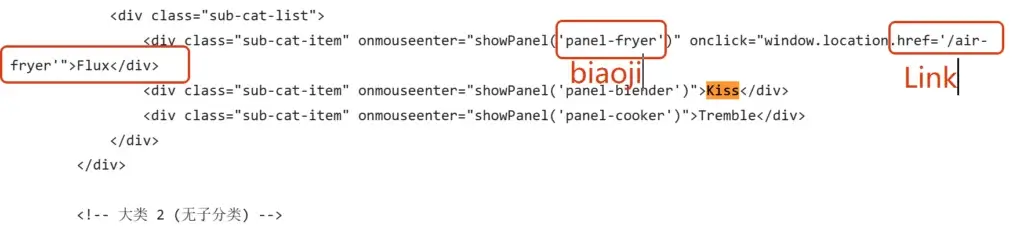
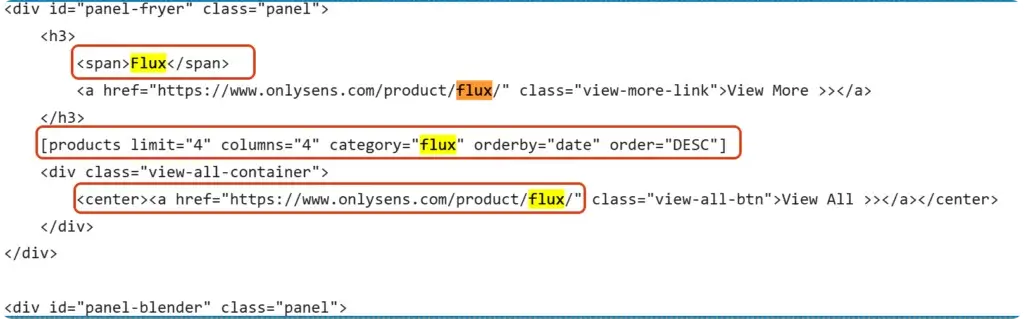
① 我们需要修改的部分分成左侧导航区(20%)和右侧导航区(80%),它们之间是一一对应关系。每个都有一对一的标记,一定要上下对应。除此之外后面有个链接,可以给左侧的子菜单添加链接,
② 如果需要添加更多的菜单,可以直接按照上面的一一对应关系复制即可。
© 文章版权归白小菌所有,🫰欢迎转发分享。未经允许请勿抄袭转载。